import Ambulatory Data
Explanation
Before stepping in the settlement and invoicing process, all billing information from the ambulatory application must be imported. Important is the format of the data transferred. Actually, E-Care supports CareCoach format. The ambulatory is based on the 3 levels of services well known in Switzerland, A, B and C (Clarification & consultation, examination & treatment, basic care).
Setup ambulatory
Before using the import process, some setup are needed.
- Service mapping
- Territory pricing
Under the menu, select Ambulatory | Ambulatory Configuration. The first setup is the ambulatory service mapping. Here, you have to map the A,B,C code in the file with your related services. Each service can be mapped to a service code for the insurance, the public authority (PA) and the patient part deduction for the PA. Mostly, each services will be grouped by day.
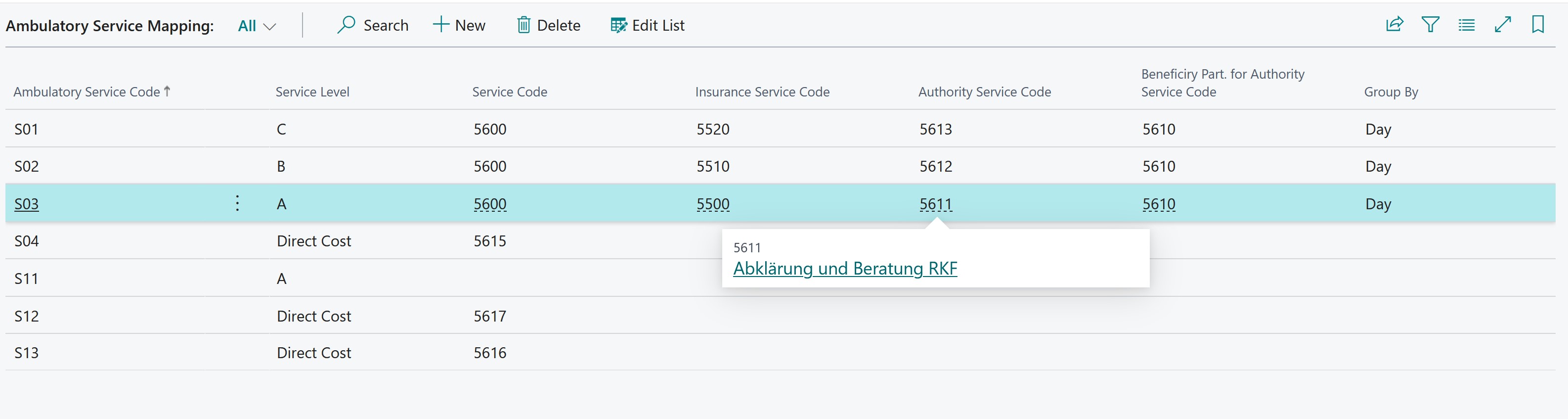 See here for more information.
Under the menu, select Ambulatory | Ambulatory Configuration. The second setup is the ambulatory territory price. Here, you specify for each teritory (canton) the price for each service, each part (insurance, public authority, beneficiary max amount) for a specific period. The age limitation can also be defined. See sample below
 See here for more information.
Import Data
under the menu, select Ambulatory | Import File. On the opened page, you see previous imported data (in green). ambulatory service mapping ambulatory territory price
Treat Data
After import, Check the imported data.
- Generate Settlement
- Calc Settlement (this computes the values based of the canton and territory pricing)
verify the results
Ambulatory - Ambulatory Calculation: set the Institution filter and the Beneficiary to analyze.
